A courier smiling at the wheel of a white RunList delivery van on a sunny suburban street
AI-powered · Built by a Sydney courier

Scan it. Sort it. Run it.

Less stress. Faster drops.
No parcel left behind.
Depot run or point to point. Scan the label or the job, one tap plans the route, and every drop slots in on the way.

No card needed. Then from A$14.99 a month. Cancel any time.

01

Scan it.

Photograph the label, or the job on your dispatch app. RunList reads it like you do and fills in the stop. No typing with cold thumbs.

  • Picks the receiver, never the sender
  • Reads handwritten, sideways and doc-pouch labels
  • Grabs pieces, phone number and delivery notes
  • Checks the address against Google before you drive off
  • Pickups too: snap your handheld or dispatch app screen
  • Got a run sheet? Photograph it, import it, or just say your jobs out loud
02

Sort it.

Tap once. Your stops come back numbered in the order that makes sense on the road, not the order they came off the pallet.
  • Live traffic, from the depot or wherever your day starts
  • Shops that aren't open yet wait till they are
  • Pick the suburb you want to hit first
  • Late job? Add it and re-sort in seconds
  • Handles runs of up to 200 drops
DEPOT 1 2 3 4 5 6 7 8 9 10 11 12
12 stops1 tap
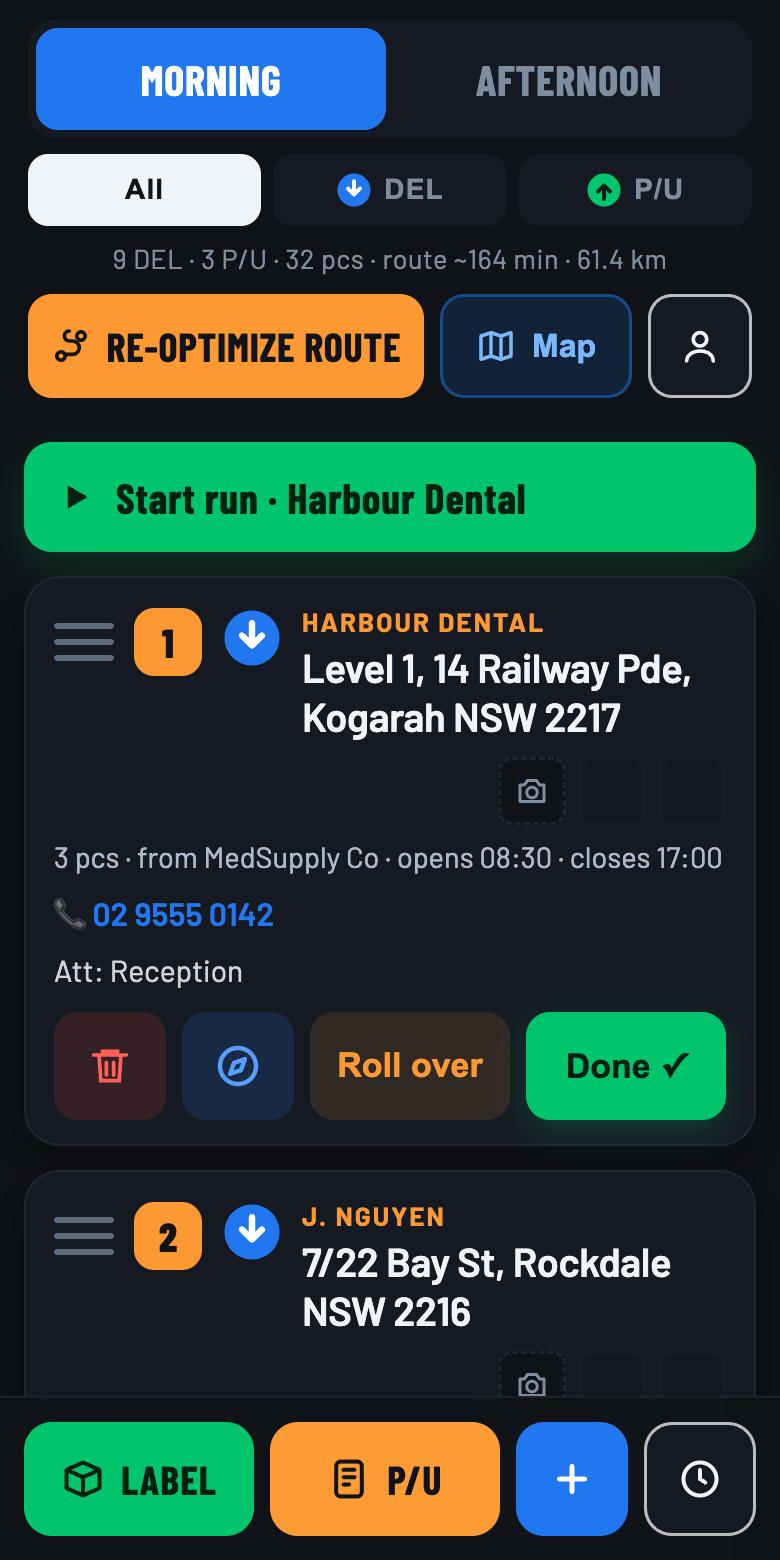
The RunList app showing a morning run of numbered stops

Point to point, sorted

Snap the job off your dispatch app and RunList adds the pickup and the drop together. It never sends you to a drop before the pickup, and drops anything on the way while you're heading to the next job.

  • Pickup and drop read from one photo of the job
  • Waits for the job's ready time before sending you
  • Drops slotted in between pickups, not saved for last
  • Depot run or point to point: switch any time
03

Run it.

Made for a phone in a cradle and one free thumb. Big buttons, nothing fiddly.

▶  Start run · Harbour Dental
Opens Google Maps on the exact pin

Straight to the door

Tap Start run and Google Maps takes you to stop 1 on the exact pin, not a guess from the address text.

➤Roll overDone ✓
Next stop becomes number 1

Done. Next.

Mark a job done and the list renumbers itself, so the next job is always number 1. On a depot run, nobody home? Roll it over to the afternoon with all its details.

Find the right box

Every stop keeps up to three photos, so you can spot the parcel in a van full of brown cartons.

Kilometre logbook for tax time

RunList asks for the odometer when you start and when you finish. Type it, or photograph the dash and AI reads it. The reason for the trip fills in from your run.

  • Catches the days you missed and reminds you
  • Totals your business kilometres and business-use %
  • Spreadsheet or PDF for your accountant, any period
  • On every plan
Voice entryRun-sheet scan + file importWhere-in-the-van noteMorning + afternoon runsTap-to-call the customerDouble-scan warningTwo-week historyDrag to reorderBig-text + light modeMap of the whole run
AI inside

AI does the typing.

Most route planners wait for you to key the stops in. RunList uses AI to read, listen and check, so the run is in your phone before the van is loaded.

Reads the label

Printed or handwritten. It picks the receiver, never the sender.

Reads your handheld

Photograph the pickup screen and the job is on your run.

Hears you

Tap the mic and say your jobs. It turns them into stops.

Reads run sheets

A photo, PDF or spreadsheet becomes a tick-list of stops.

Reads the dash

Snap the odometer and your logbook fills itself in.

Next up: Co-driver, an AI agent you talk to while you drive.

Using Spoke, Circuit or RoadWarrior?

Good route planners put stops in order. RunList adds AI for the part before that: getting a van-load of freight labels and pickup jobs into the list without typing.

RunList AISpoke*RoadWarrior*
AI that reads labels, handhelds, run sheets and your voiceYesNot listedNot listed
What a label scan readsReceiver, company, address, phone, pieces, notesAddressNot listed
Scan jobs off your handheld or dispatch appYesNot listedNot listed
Kilometre logbook for the ATOYes. Odometer by photo, accountant-ready exportNot listedNot listed
Parcel photos on every stop, to spot the box fastYes. Up to threeNot listedNot listed
History of every delivery and pickupTwo weeks, photos includedPast routesNot listed
Opening hoursLooked up for you; shops held till they openSet by handSet by hand
Morning and afternoon runs with roll-overYesNot listedNot listed
Checks each address against Google and flags mismatchesYesNot listedNot listed
Piece count and double-scan warningYes. No carton left behindNot listedNot listed
Tap to call the receiver, number read off the labelYesNot listedNot listed
Voice entry, run-sheet scan, file importYesYesFile import
AI co-driver you talk to mid-runComing soonNot listedNot listed
Label scanning on the cheapest paid planYesNoNot listed
Paid plans start at, per monthA$14.99A$14.99A$22.99

*From each company's published pricing and help pages and Australian App Store listing, October 2026. "Not listed" means we couldn't find it there. Spoke, Circuit and RoadWarrior are trademarks of their owners. RunList is not affiliated with them.

Built in a van.Not a boardroom.

RunList was built by a working Sydney courier who was fed up with the other courier apps. They were missing what he needed on a real run, and they slowed him down. He needed speed and efficiency to get the job done, so he built it himself.

It's used on real runs every day, and it works whoever you drive for, because it reads the same label you do.

One driver. Your price.

Try everything free for 14 days, no card needed. Then pick what suits your run.

Lite

A$14.99 /mo
Inc. GST · billed monthly · cancel any time
  • Unlimited AI label scans
  • Best-order routes up to 200 drops
  • Kilometre logbook for tax time
  • Map, navigation, parcel photos
  • Address check and double-scan warning
  • One run a day
Start free trial

Standard

A$29 /mo
Inc. GST · billed monthly · cancel any time
  • Everything in Lite
  • AI reads pickup jobs off your handheld
  • Opening hours looked up, shops held till open
  • Morning and afternoon runs with roll-over
  • Voice entry, run-sheet scan, file import
Start free trial
Coming
soon

Co-driver

A$49 /mo
Planned price, inc. GST. Everything in Standard, plus:
  • Agentic AI co-pilot
  • Tap the mic and talk to it mid-run
  • Change the run by voice: add, skip, reorder
  • Remembers your regulars and past runs
  • Speaks up before a shop shuts
  • Start-of-day briefing, end-of-day wrap-up

Fair questions

Does it work with my freight company?

Yes. RunList doesn't plug into any freight system, so it works whoever you drive for. It reads the printed label, the handheld's screen or the job on your dispatch app, the same way you do.

Do I need to type addresses?

Hardly ever. Scan the label, photograph a whole run sheet, import a spreadsheet or PDF, or tap the mic and say your jobs. If you do type, suggestions fill in the rest. Every address is checked against Google Maps.

Does it work outside Sydney?

Yes, anywhere in Australia. RunList works around your own depot, so addresses, suggestions and routes are matched to your area.

Does it keep my kilometre logbook?

Yes. Enter the odometer at the start and end of the day, or photograph the dash and RunList reads it. The trip purpose fills in from your run, and you can send your accountant a spreadsheet or PDF for any period. Check with your accountant which records your vehicle needs.

What is Co-driver?

An AI agent we're building for the run itself. Tap the mic and tell it what's changed, and it reworks the run, remembers your regular stops and warns you before a shop shuts. It isn't available yet. Tell us you're interested and we'll email you when it's ready.

Is there an app?

RunList works in your phone's browser today at runlist.com.au. The iPhone and Android apps are coming soon, and you'll use the same login on both.

What happens after the free trial?

When the 14 days are up you pick Lite or Standard. If you don't, your account pauses. Nothing is charged until you choose a plan.

Who can see my runs?

Only you. Finished jobs and photos are deleted automatically after two weeks. You can delete your whole account at any time from inside the app. Privacy policy.

I run a few vans. Can my drivers use it?

Team accounts are on the way. Get in touch and we'll set you up.

Tomorrow's run,
sorted.

14 days free. No card. About a minute to set up.

Coming soon on theApp Store Coming soon onGoogle Play
Start free trial